Discover how DoseDost simplifies medication management
Get expert answers about DoseDost, the premier pill reminder and medicine tracker built for Indian families. Whether you are a caregiver overseeing home health or a senior utilizing our intuitive audio alerts, discover how our localized features and smart inventory tracking ensure total peace of mind. Streamline your medication routine today with India’s most reliable digital health companion.
Learn More About DoseDost
We are here to support you in every step of your health journey. From setting personalized pill reminders to managing multiple family profiles and smart inventory tracking, we’ve got you covered. Browse through our detailed FAQs to find answers to all your queries about our Medication Management App and discover how we make daily care simpler for everyone.
General FAQs
How can I download DoseDost app?
You can download the app by directly clicking on the link https://play.google.com/store/apps/details?id=com.medicine.dosedost
Is DoseDost free to use?
Yes, DoseDost offers free core features like medicine reminders, missed dose alerts and SMS, inventory tracking and low-stock alerts, audio assistance, medical records, BP and Sugar records and appointment reminders.
There are premium features like, Ad-Free option, Secondary User Access, AI-Driven Medicine Entry, Pharmacy Integration, Enhanced Storage & Audio and many others.
Is my data secure?
Yes, your data is encrypted and stored securely. DoseDost prioritizes user privacy and complies with all relevant data protection laws.
Can I use DoseDost app without an internet connection?
Yes! The app works offline for adding medicines, setting reminders, and tracking doses. However, features like syncing data or updates and Text to Speech (TTS) may require internet connectivity.
Does DoseDost support regional languages?
Currently, DoseDost supports English only. Hindi, Telugu, and Odia will be available soon followed by other Indian languages.
Can I use DoseDost for multiple family members?
Yes! With DoseDost Premium, you can create multiple profiles and manage medications for your entire family from one mobile device.
Do I need to create an account to use DoseDost?
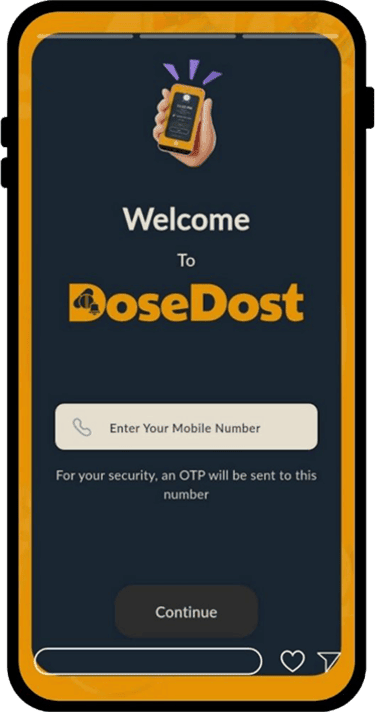
Yes, you must register with your mobile number to use DoseDost. This ensures a personalized experience, secure data management, and access to all app features, including syncing data across devices and premium options.
How do I set a medication reminder?
Setting a reminder is easy! Go to the "Add Medicine" section, fill in the details like name, dosage, and time, and save. DoseDost will notify you when it’s time to take your medicine.
Can I snooze a reminder?
Yes! When a reminder pops up, you’ll have the option to "Take," "Skip," or "Snooze." Choose "Snooze" to delay the reminder for a few minutes.
Can I set reminders for irregular medication schedules?
Yes, DoseDost supports flexible scheduling options like alternate days, specific days, cyclic schedule and as-needed reminders to fit your unique routine.
What happens if I delete a medicine or reminder by mistake?
If you delete a medicine or reminder accidentally, you can re-add it manually. Future updates may include an undo option for such scenarios.
What happens if I miss a dose?
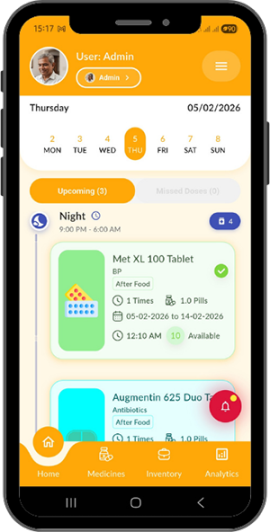
If you miss a dose, DoseDost logs it under the "Missed Doses" section. You can review and adjust your schedule later to stay on track.
Does the app track medicine usage?
Yes, DoseDost keeps a record of your medication schedule, including doses taken, skipped, or missed. You can view these details in the Reports & Analytics section.
Will I get alerts if I skip or forget to take my medicine?
Yes! DoseDost sends a follow-up alert if you miss or skip a dose. You can also check missed doses in the app's logs.
Can I use DoseDost to track over-the-counter (OTC) medicines?
Absolutely! You can add any medicine, including prescription and OTC medicines, to your schedule.
How does the inventory threshold alert work?
You can set a minimum stock level for each medicine in the app. DoseDost will send you an alert when your stock reaches this level, so you can refill on time.
Module-wise FAQs
Settings
How do I edit my profile?
Go to Settings → Edit Profile, edit your details, and UPDATE
How can I change the app language?
Go to Settings → Change Language and select your preferred language and press CONTINUE
How do I disable or delete my account?
Navigate to Settings → Account Management and choose Disable or Delete
Can I enable dark mode?
Yes, go to Settings → Select Dark Theme
User Profile
How do I add a user profile?
Login -> Enter Your Mobile Number -> Enter OTP → You will be directed to User Profile Creation Page -> Enter details, and UPDATE
How do I edit user profile?
Go to Menu -> Settings -> Edit Profile → Enter details, and UPDATE
Can I delete a user profile?
Navigate to Settings → Account Management and choose Disable or Delete
Member Management
How do I add a family member?
Go to Main Menu -> Family Member – Add New Family Member -> enter Basic Info, and save.
You may enter Optional Details, like Medical Info. and Additional Info.
Alternatively, go to Home Page -> Tap on the Member -> Add New Family Member
Can I update or remove a member?
Yes, you can Edit/Delete any member anytime. Go to family Member -> Tap on Edit or Delete button
How can I change (swap) member?
Go to family Member -> Select the Radio Button for the member you want to select -> Confirm Selection
General FAQs
How can I download DoseDost app?
You can download the app by directly clicking on the link https://play.google.com/store/apps/details?id=com.medicine.dosedost
Is DoseDost free to use?
Yes, DoseDost offers free core features like medicine reminders, missed dose alerts and SMS, inventory tracking and low-stock alerts, audio assistance, medical records, BP and Sugar records and appointment reminders.
There are premium features like, Ad-Free option, Secondary User Access, AI-Driven Medicine Entry, Pharmacy Integration, Enhanced Storage & Audio and many others.
Is my data secure?
Yes, your data is encrypted and stored securely. DoseDost prioritizes user privacy and complies with all relevant data protection laws.
Can I use DoseDost app without an internet connection?
Yes! The app works offline for adding medicines, setting reminders, and tracking doses. However, features like syncing data or updates and Text to Speech (TTS) may require internet connectivity.
Does DoseDost support regional languages?
Currently, DoseDost supports English only. Hindi, Telugu, and Odia will be available soon followed by other Indian languages.
Can I use DoseDost for multiple family members?
Yes! With DoseDost Premium, you can create multiple profiles and manage medications for your entire family from one mobile device.
Do I need to create an account to use DoseDost?
Yes, you must register with your mobile number to use DoseDost. This ensures a personalized experience, secure data management, and access to all app features, including syncing data across devices and premium options.
How do I set a medication reminder?
Setting a reminder is easy! Go to the "Add Medicine" section, fill in the details like name, dosage, and time, and save. DoseDost will notify you when it’s time to take your medicine.
Can I snooze a reminder?
Yes! When a reminder pops up, you’ll have the option to "Take," "Skip," or "Snooze." Choose "Snooze" to delay the reminder for a few minutes.
Can I set reminders for irregular medication schedules?
Yes, DoseDost supports flexible scheduling options like alternate days, specific days, cyclic schedule and as-needed reminders to fit your unique routine.
What happens if I delete a medicine or reminder by mistake?
If you delete a medicine or reminder accidentally, you can re-add it manually. Future updates may include an undo option for such scenarios.
What happens if I miss a dose?
If you miss a dose, DoseDost logs it under the "Missed Doses" section. You can review and adjust your schedule later to stay on track.
Does the app track medicine usage?
Yes, DoseDost keeps a record of your medication schedule, including doses taken, skipped, or missed. You can view these details in the Reports & Analytics section.
Will I get alerts if I skip or forget to take my medicine?
Yes! DoseDost sends a follow-up alert if you miss or skip a dose. You can also check missed doses in the app's logs.
Can I use DoseDost to track over-the-counter (OTC) medicines?
Absolutely! You can add any medicine, including prescription and OTC medicines, to your schedule.
How does the inventory threshold alert work?
You can set a minimum stock level for each medicine in the app. DoseDost will send you an alert when your stock reaches this level, so you can refill on time.
Module-wise FAQs
Settings
How do I edit my profile?
Go to Settings → Edit Profile, edit your details, and UPDATE
How can I change the app language?
Go to Settings → Change Language and select your preferred language and press CONTINUE
How do I disable or delete my account?
Navigate to Settings → Account Management and choose Disable or Delete
Can I enable dark mode?
Yes, go to Settings → Select Dark Theme
User Profile
How do I add a user profile?
Login -> Enter Your Mobile Number -> Enter OTP → You will be directed to User Profile Creation Page -> Enter details, and UPDATE
How do I edit user profile?
Go to Menu -> Settings -> Edit Profile → Enter details, and UPDATE
Can I delete a user profile?
Navigate to Settings → Account Management and choose Disable or Delete
Member Management
How do I add a family member?
Go to Main Menu -> Family Member – Add New Family Member -> enter Basic Info, and save.
You may enter Optional Details, like Medical Info. and Additional Info.
Alternatively, go to Home Page -> Tap on the Member -> Add New Family Member
Can I update or remove a member?
Yes, you can Edit/Delete any member anytime. Go to family Member -> Tap on Edit or Delete button
How can I change (swap) member?
Go to family Member -> Select the Radio Button for the member you want to select -> Confirm Selection
Contact Our Support Team
Have more questions about DoseDost’s features, premium options, or benefits? Reach out to our friendly experts for personalized assistance.